Every agent, one inbox. See which one needs you.
Even the best developers burn out watching 40 terminals. Needs you puts every agent's questions and finished replies in one list, questions first, so you see which agent is waiting and answer it, or open its terminal with one click.
- On your MacMiko for Mac
- On your phoneMiko for iPhone
In Miko for Mac
How it works.
An agent stops to ask
Its title bar gets an amber badge, and the question lands in Needs you: one list for every project, questions first.
You hear about it
Codex questions bring a macOS notification and a soft ping, even with Miko in the background. Other terminals chime in the app, and Miko, the little star in the corner, waves.
Answer in place
Answer Codex questions right in Needs you and the agent carries on. Other terminals open with one click.
Read the reply
When an agent finishes, its reply gets its own card while your terminals keep running.
 Studio · T2Launch siteOpen terminal ↗
Miko for Mac
Finished replies get their own card.
When an agent finishes, its reply lands in Needs you in a card of its own. Codex shows its latest agent message. Other CLIs show a labelled excerpt of the terminal from the moment they notified you.
- Copy text, Hand off…, Review…, Read & next or Open terminal, right from the card.
- Hand off… sends the reply to an idle terminal in the same workspace, to continue, review or unblock. Nothing is sent until you press Send, and a review comes back to Needs you, linked to the original.
- Each card is the agent's own report. Open the terminal for the full conversation and checks.
- A new turn replaces the card, and excerpts are never saved as another transcript.
Starter and Cloud
Done, for the agents that are finished.
A clear Done state for finished agents, with a done counter next to ◆ Needs you. Only Needs you and Done count and can notify you.
- A blue Update marks an agent that reported but is still working. It doesn't count.
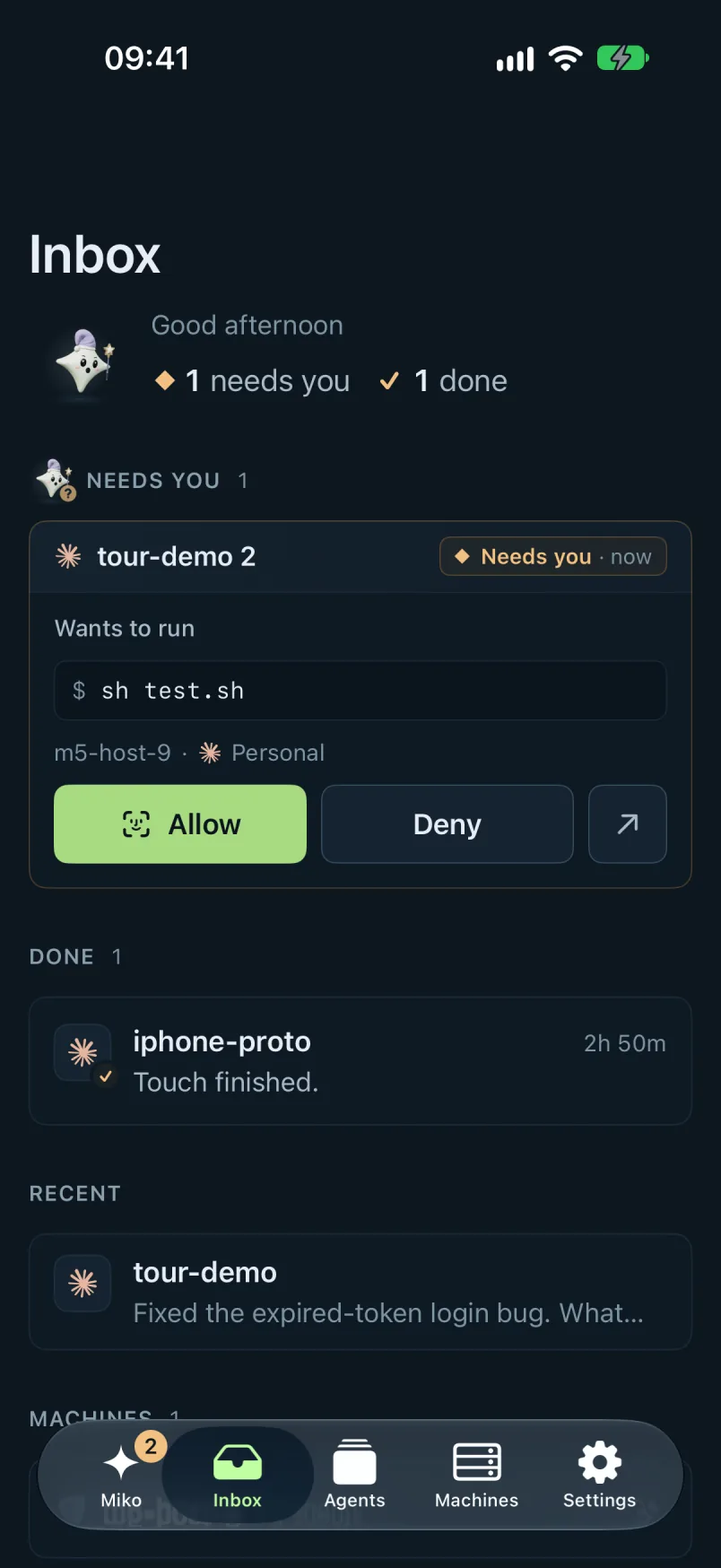
On your phone
Answer from your phone.
Every question from every agent and account lands in Needs you. Approve or reply from your phone and the agent carries on.
- Each card says why it's waiting: Needs permission, Has a question, Waiting for your review or Stopped with an error.
- Press Allow, Deny or Deny with a note…, or pick one of the question's own options.
- Pair Miko for iPhone from your Mac or a browser and get notified. On Android, use Chrome.
- Quiet hours start as 22:00 to 07:00 and can still let permission requests or questions through. Hide details on the lock screen leaves out names, commands and questions.
- Notification contents are encrypted on your machine before they're sent, so Apple and Google only carry sealed messages.
Do agents stop when I close my laptop?
With Miko Starter and Miko Cloud: no. They run on a machine of your own, in our cloud or on your own server, so they keep working and you answer them from your phone. With the Mac app, they keep working while your Mac is awake.
Is there an iPhone app?
Yes. Miko for iPhone is its own app. You sign in by pairing it from the web app or Miko for Mac, in Settings › Devices › Add iPhone, and it works with every provider.
How do I use it on Android?
With Miko Starter and Miko Cloud, open Miko in Chrome, then press Enable notifications in Settings. Adding it to the Home Screen is optional.
What does Done show?
With Miko Starter and Miko Cloud, finished agents get a clear Done state, with a done counter next to ◆ Needs you. Only Needs you and Done count and can notify you; a blue Update marks an agent that reported but is still working.
Get your invite.
Join the waitlist and we'll email you an invite.
Every plan has every feature.